Livora: Android local media manager with light creative tools
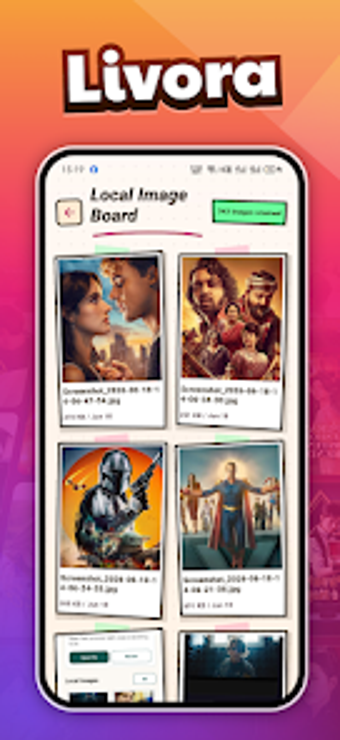
Livora, from Vky Gaming Starji, is an Android utility for organizing local images and videos and capturing quick visual notes. The app scans on-device storage to expose metadata like filenames and dates while listing video durations and file sizes to aid selection. It pairs basic template-based image editing with a memo page system and a frame-preview mode for rapid clip identification. Target users include Android owners who want a more capable, privacy-centered gallery alternative.
What type of tool is Livora and how it operates?
Livora acts as a local media hub that indexes photos and video files stored on the device, presenting file-level metadata such as names and timestamps and a catalog of video items with duration and size fields. The design keeps file handling on-device, and the app exposes quick visual browsing aids so a user can triage large media collections without exporting items to other services.
How the app interacts with the device and requirements
The app runs on Android 8.0 and newer, so it depends on current mobile platform APIs for file access and media decoding. Because it performs local indexing and presents previews from device storage, the workflow avoids mandatory cloud upload steps. That behavior ties functionality to on-device storage structure and permissions granted at install or first run.
Is Livora designed with safety and data privacy in mind?
The developer declares a privacy-focused model: the application does not share user data with third parties and uses encryption for data in transit, according to its data safety statement. Those explicit commitments reduce exposure to external services, making the app a fit for people who prefer keeping media under their direct control rather than handing files to remote servers.
Who can use it comfortably and what skills are required?
The interface centers on direct browsing and quick editing templates that let non-experts assemble simple covers and notes without deep editing knowledge. Casual users can use the memo pages to combine text with images; users expecting advanced image or video manipulation should plan to use a dedicated editor. The app suits people who want straightforward local media organization rather than professional post-production.
Recommendation and who benefits most
Livora is a practical option for Android owners who prioritize on-device control and straightforward media workflows. Its current public footprint is small, which suggests the app remains in early circulation and may change with future updates. Choose it if you prefer local media handling and light creative workflows; those needing advanced editing should pair it with a dedicated editor. Recommended.